Open the creator’s browser version
Open baperrasta.com in a current mobile browser and tap the yellow “রাস্তায় নামেন” button. Use the browser directly if an in-app social-media browser has trouble loading the game. A separate app download is not required to begin a browser run.
We checked the live game in Chromium with a 390 × 844 touch viewport and also inspected an 844 × 390 landscape view. These are browser-emulation observations, not results from a physical Android phone or iPhone.
Direct browser test
Find the real on-screen controls
Left and right arrows steer. “চালান” is the accelerator and “ব্রেক” is the brake. The lightning “টান” button boosts; “হর্ন” is the horn and “শব্দবোমা” is the sound bomb. The speaker icon toggles sound.
A short touch press on the accelerator moved the auto and reduced the displayed battery from 100% to 99%. We did not verify every multi-touch combination, sustained performance or tactile comfort on real hardware.
Direct browser test
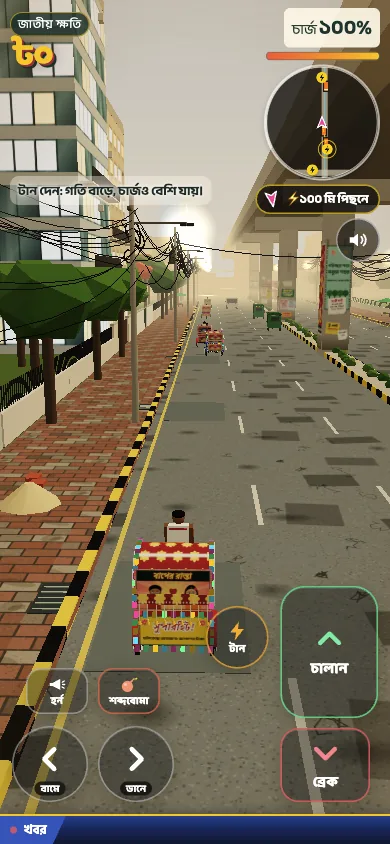
Captured from baperrasta.com · Game by Omar Faruqe Riyad · 26 Oct 2026
Try landscape for more road width
Both portrait and landscape layouts showed the game and touch controls in our check. Landscape gives a wider road view; try it if your thumbs cover too much of the portrait screen. This is a layout suggestion, not a confirmed requirement or a claim of faster performance.
If rotation does nothing, check your device’s orientation lock. Use your browser’s available fullscreen or toolbar-hiding behaviour if it offers one. Fullscreen availability varies; this guide does not promise a fullscreen control on every mobile browser.
General browser advice
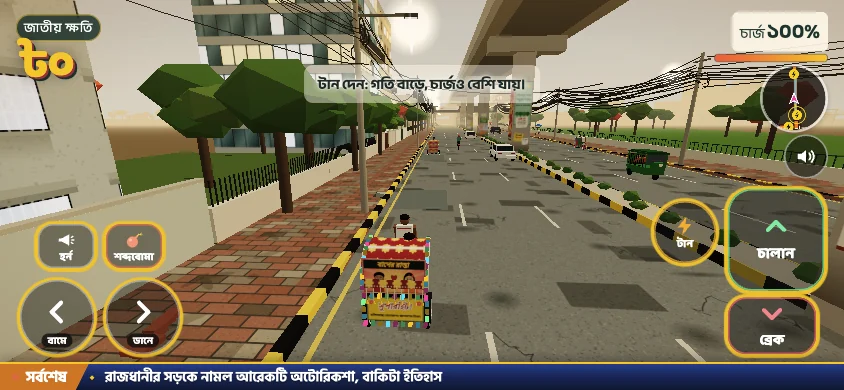
Captured from baperrasta.com · Game by Omar Faruqe Riyad · 26 Oct 2026
Home-screen shortcuts are optional
You can play from a normal browser tab. The original shows an install-style button, but we did not complete installation or test offline play. If your browser offers “Add to Home Screen” or “Install”, follow its own instructions.
Adding a website to the home screen is not evidence of an official native app or an APK. We do not host an APK, and we do not claim the guide or game will work offline on your device.
General browser advice
Sound and performance on a phone
Start the game with a deliberate tap before diagnosing silent audio. Check the speaker button, media volume, silent-mode settings and connected Bluetooth audio. A successful mute-toggle check does not prove that sound is audible on every device.
For stutter, first close other heavy tabs and try a fresh foreground tab. Give a hot phone time to cool and compare another current browser. These are general browser checks; we have not measured frame rates or a minimum supported phone.
General browser advice